Shopify app
Microsoft Shopping Feed
Sync your catalog to Microsoft Shopping. Free for up to 100 products, or Unlimited for $9.99/mo — custom rules and real support.
Install Microsoft Shopping Feed
Connect your Microsoft Ads account and the app builds and syncs your product feed automatically.
Free — No credit card. Publish up to 100 products to Microsoft Merchant Center. If your catalog is larger, the first 100 still publish and you can upgrade anytime.
Unlimited — $9.99/mo — No product cap. Sync your full catalog. Same exclusion rules, sync, and human support as Free. Existing paying shops stay uncapped.
Exclude products or variants with rules on vendor, type, price, and more. Works in every country and currency Microsoft Shopping supports, including free and paid listings.
Setup is a few steps, then products stay in sync. If Merchant Center does not match what the app shows, email microsoftfeed@bysimpli.com and a person will help.
- Exclude products and variants by vendor, type, price, and more
- Free plan publishes up to 100 products; Unlimited ($9.99/mo) has no size cap
- Automatic feed sync after you connect Microsoft Ads
- Works in every country and currency Microsoft Shopping supports
- Human support from people who work in Microsoft Ads every day Install Microsoft Shopping Feed
Microsoft Shopping Feed How To Guides & FAQs
I can’t connect my account. What’s wrong?
The most common reason this happens is because your Microsoft Ads account either is not active, or is not associated with your Microsoft Live account.
Even if you already have a Microsoft Live account you need to follow the instructions here to set up Microsoft Ads.
Why does it say my merchant store is inactive?
This is usually because your Microsoft Merchant Center store has not yet been approved by Microsoft. Most stores are approved instantly but in some cases it can take up to three business days.
My Microsoft Ads account was suspended. What can I do?
Unfortunately, this is not something we can help with.
Usually when an account is banned it is because the products violate one of Microsoft’s advertising policies. The most common kinds of products are: lingerie, adult toys, and vaping / electronic cigarettes.
Everything is connected and my products are published. Where is my feed file?
We use Microsoft’s API to directly upload and update your products. This means we do not need feed files to keep your products up-to-date and you will not see a feed file associated with your product catalog on Microsoft Ads
If you need the feed file because you are unable to connect your Microsoft Ads account, need to provide it to a partner agency, or for some other reason, it is available for download on the Settings page. The url can also be used for automatic feed downloads via the Microsoft Ads Merchant center.
Where can I check the status of my products?
The best place to check is in the Microsoft Ads Merchant Center. Here you can see the number of products uploaded and their approval status. Please note that this can take up to one hour to update with new product information.
If you want to see the latest product approval information, click “Run report” and download the report generated.
Some of my products aren’t updating or are out of sync
Publish – On Free, up to 100 products are published; Unlimited publishes the full catalog.
How do I exclude certain products from my feed?
You can also exclude products and variants by vendor, product type, price, and similar rules using custom rules. Exclusion rules work on Free and Unlimited.
Error: product URL is not a sub-path of the store domain
This happens because the domain in the URL for a product is not the same as the Microsoft Merchant Center store domain.
To fix it, first check the Primary Domain in your settings. It should not end in .myshopify.com.
Next, in your Microsoft Ads account go to the Merchant Center and check on your store settings. See the screenshots below for how to find your store settings.
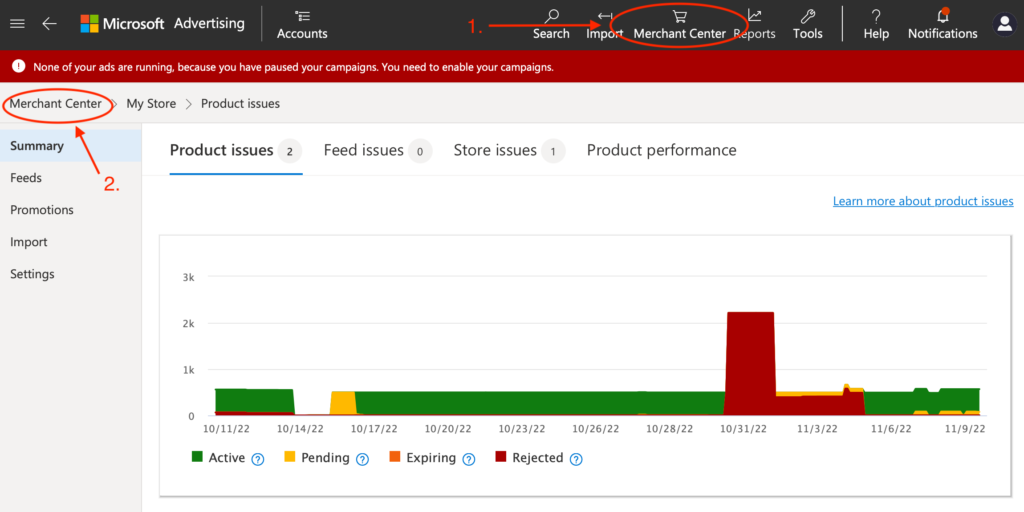
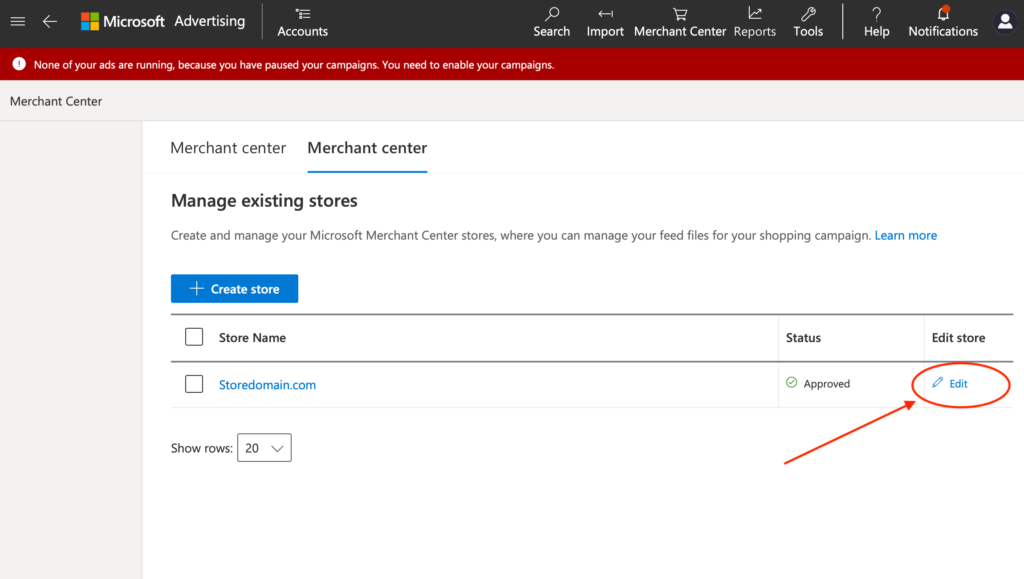
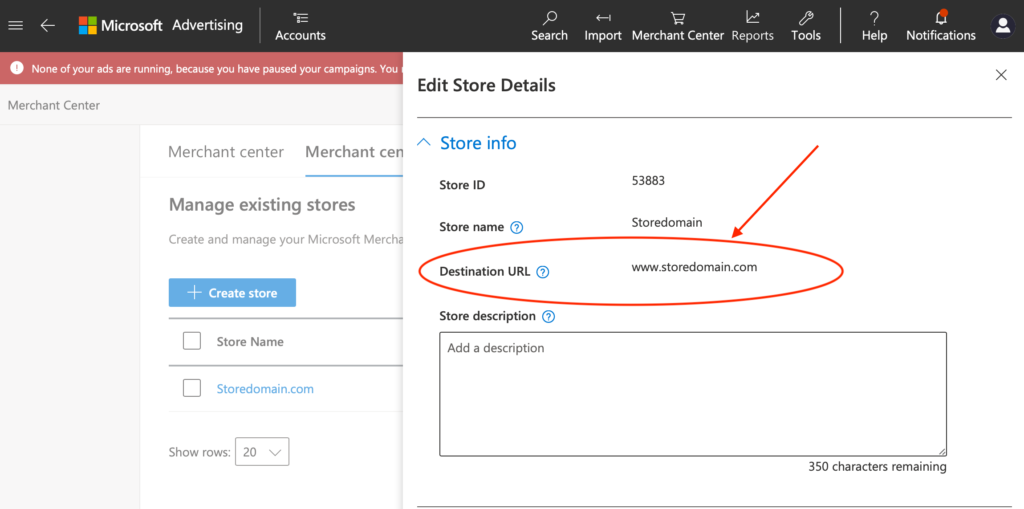
The Destination URL should match the Primary Domain you checked earlier. If it does not, then you need to create a new Merchant Center Store with the correct domain. Note that you may also have to wait for this new store to be approved.
With the new store created you now need to update your Microsoft Ads account connection.
Error: offer pending while Microsoft crawls images
After publishing your products for the first time, Microsoft will check your website for product images. This is the last step before your products are approved and can take up to 24 hours depending on the size of your product catalog.
After Microsoft finishes crawling the images your products will be automatically approved and you can use them in Microsoft Shopping Campaigns.
In the setup when I connect my account I just get a spinning loading wheel
A spinning loading wheel at the Microsoft ad connection stage can be caused by a few things so check through this list:
-
Your microsoft account may have organization authentication and you used a personal email address.
In this case – please reach out to adsupport@microsoft.com
with the following message “
Hi team,I am currently using a 3rd party shopify app to sync my product catalog to microsoft ads. The tool uses the BingAds-Python-SDK and my account is causing issues with the tool.When the tool admin reached out to your team on github (seen here https://github.com/BingAds/BingAds-Python-SDK/issues/259#issuecomment-1793974817) your team explained that in the log my account is causing these issues because “User chose organization authentication type but only have personal account”
How do I resolve this?”
-
If you have 2FA enabled there could be an issue – please reach out to us
Only 100 of my products are publishing
You are on Free and your catalog has more than 100 products. The first 100 still publish; the rest do not until you upgrade to Unlimited ($9.99/mo) or drop under 100. You’ll get a weekly email from microsoftfeed@bysimpli.com until then.